
Bluewire Media ← Back to the Hub
Session 3 · Setup 2 of 3 · Extraction from your AI history

AI Brain v1.0. One extraction prompt, twelve knowledge files.

If you have a thorough AI history, this extracts version one of your AI Business Brain™ from it. Twelve knowledge files plus your deployable system prompt, ready to upload. One sitting, no homework. The interviews enrich it from here.

It’s one prompt, version 1.2. Read it in the doc, or just copy it from the page below. Same prompt either way.

Read the mega prompt v1.2
Starting fresh or lean history? Use the guided interviews instead →

First, copy the mega prompt.

The mega prompt v1.2

The same v1.2 prompt as the doc, ready to copy. Take the whole thing, no trimming, it only works as one piece. Paste it where your AI history lives and it starts producing File 1 straight away.

Loading the prompt…
Prefer to read it in Google Docs first? Open the versioned doc (v1.2) →
How the extraction works

One prompt makes all 13 files. It hands them to you one at a time, you upload each, tick as you go.
1Copy the mega promptThe one above
2Paste where your history livesThe AI you use most
3Type NEXT after each fileMoves to the next output
4
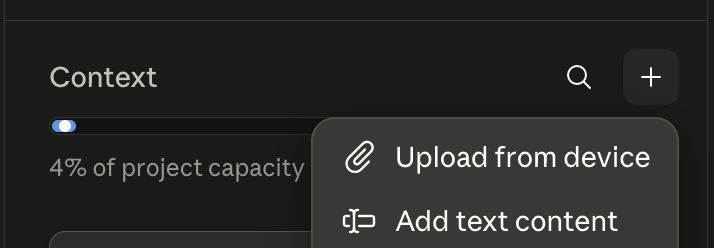
Upload each outputContext → + → Add text content → title it, e.g. Founder (1)
Claude project Context panel: click the plus button, then choose Add text content
Open Context, hit +, choose Add text content, and paste.
5Tick it offThen type NEXT again
Two exceptions. File 13 (Brain Instructions) is your system prompt, so paste it into the project’s Instructions, not Context. And File 12 (AI Guardrails) is the one to read and correct yourself before you rely on it.
The 13 files it produces · v1.2

Upload each one, then tick it.

The mega prompt outputs these in order. Add each to your project as its own file, then tick it here so you can watch your Brain fill up.

0 of 13 uploaded
1Founder
2Decision Making & Philosophy
3Goals & Vision
4Business Operations
5Ideal Client
6Market Position & Messaging
7Voice Profile
8Voice & Taste (Write Like Me)
9Stories
10Frameworks & IP
11Anti-AI Writing Standards static file
File 11 goes straight in. The Anti-AI Writing Standards are a fixed, static document. Upload it exactly as the prompt outputs it, no edits needed.
12AI Guardrails
Read File 12 (AI Guardrails) yourself first. It’s the one file where a wrong inference matters. Correct it and add what’s missing before you rely on it.
13Brain Instructions system prompt
The finish line
What done looks like

All 13 in your project. The twelve knowledge files added, prompt 13 pasted into your Instructions, and File 12 (AI Guardrails) read and corrected by you. That is a working AI Business Brain™ v1, live. It won’t be perfect, and it doesn’t need to be. You sharpen it every time you use it, and the interviews deepen it from here.

Want to go deeper?

The guided interviews sharpen every file.

Interview Questions →