AI Business Brain™ Install. One question at a time.
Guided interview modules that unpack your knowledge, thinking and IP. The AI asks, you answer. Use voice typing so you can brain dump rather than type. Every prompt is on this page, ready to copy. The starred modules get you a working Brain v1 in one or two sessions.
Each prompt turns your AI into an interviewer. It asks the questions, you answer out loud, and it writes the knowledge file for you. Same five moves every time. Work down all 13 and tick each off as you go.
1Copy the prompt
2Paste into a new AI chatIt interviews you, just answer
3Review the knowledge fileIt writes it, check it reads
4
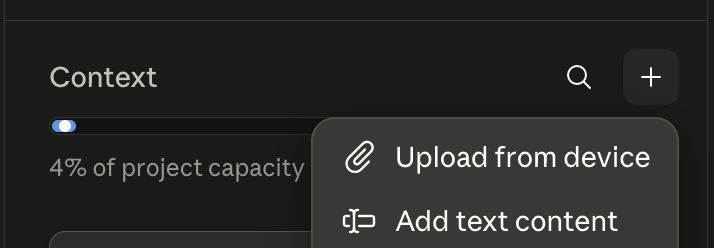
Upload it to your projectContext → + → Add text content → paste → title it, e.g. Founder (1)Open Context, hit +, choose Add text content, and paste.
5Tick it offThen start the next
Two exceptions. First time only, read Module 0 and turn on voice typing so you can speak your answers instead of typing. And prompt 13 (Brain v1 Instructions) is your system prompt, so at step 4 it goes in the project's Instructions, not Context.
The 13 prompts · v10.0
Your checklist. Work down all 13.
Hit Copy prompt on a row, run it, then open the row and tick Uploaded once it's in your project. Starred modules ★ are the quick wins, so do 1, 4, 5, 8 and 13 first for a working Brain v1.
0 of 13 uploaded
Founder
1Founder ★Who you are, genius zone, non-negotiables▾
Paste it into a new Claude chat
Answer the interview questionsFeel free to PASS or FINISH EARLY if it’s too much
Get your knowledge file
Loading…
2Decision Making & PhilosophyHow you think and handle risk▾
Paste it into a new Claude chat
Answer the interview questionsFeel free to PASS or FINISH EARLY if it’s too much
Get your knowledge file
Loading…
3Goals & VisionWhere you're taking the business▾
Paste it into a new Claude chat
Answer the interview questionsFeel free to PASS or FINISH EARLY if it’s too much
Get your knowledge file
Loading…
Business
4Business ★Offers, pricing, team, sales process▾
Paste it into a new Claude chat
Answer the interview questionsFeel free to PASS or FINISH EARLY if it’s too much
Get your knowledge file
Loading…
5Ideal Client ★Who they are and how they decide▾
Paste it into a new Claude chat
Answer the interview questionsFeel free to PASS or FINISH EARLY if it’s too much
Get your knowledge file
Loading…
6Market Position & MessagingThe category you own, the language that lands▾
Paste it into a new Claude chat
Answer the interview questionsFeel free to PASS or FINISH EARLY if it’s too much
Get your knowledge file
Loading…
Personality & Character
7Voice ProfileBeliefs, standards, hard nos▾
Paste it into a new Claude chat
Answer the interview questionsFeel free to PASS or FINISH EARLY if it’s too much
Get your knowledge file
Loading…
8Writing & Voice Analysis ★Voice patterns from real samples▾
Paste it into a new Claude chat
Answer the interview questionsFeel free to PASS or FINISH EARLY if it’s too much
Get your knowledge file
Loading…
9StoriesPSL format for content and keynotes▾
Paste it into a new Claude chat
Answer the interview questionsFeel free to PASS or FINISH EARLY if it’s too much
Get your knowledge file
Loading…
10Frameworks & IPYour named methodologies▾
Paste it into a new Claude chat
Answer the interview questionsFeel free to PASS or FINISH EARLY if it’s too much
Get your knowledge file
Loading…
11Anti-AI Writing Standards v4.0No prompt · goes straight inA fixed standard. Copy it and upload as-is, no AI step▾
This one goes straight in. It’s a fixed standard, the same for everyone, so there’s no chat step. Just copy the text below and add it to Context as a knowledge file, exactly as-is.
Loading…
AI Brain
12AI GuardrailsBoundaries and escalation rules▾
Paste it into a new Claude chat
Answer the interview questionsFeel free to PASS or FINISH EARLY if it’s too much
Get your knowledge file
Loading…
13Brain v1 Instructions ★The behavioural constitution (your system prompt)▾
Loading…
File 14 — Brain v2 Instructions. Once every file is complete, generate the full v2.0 system prompt and retire v1. That one lives in the doc. Open File 14 in the doc (v10.0) →
★ Quick wins: Files 1, 4, 5, 8 and 13 get you a working AI Business Brain™ v1 in one or two sessions.
The finish line
What done looks like
The five starred prompts done, and each file in your project. Prompts 1, 4, 5, 8 as knowledge files, and prompt 13 pasted into your Instructions, gets you a working AI Business Brain™ v1. Done beats perfect. Come back for the other eight when you can, each one makes the Brain sharper.